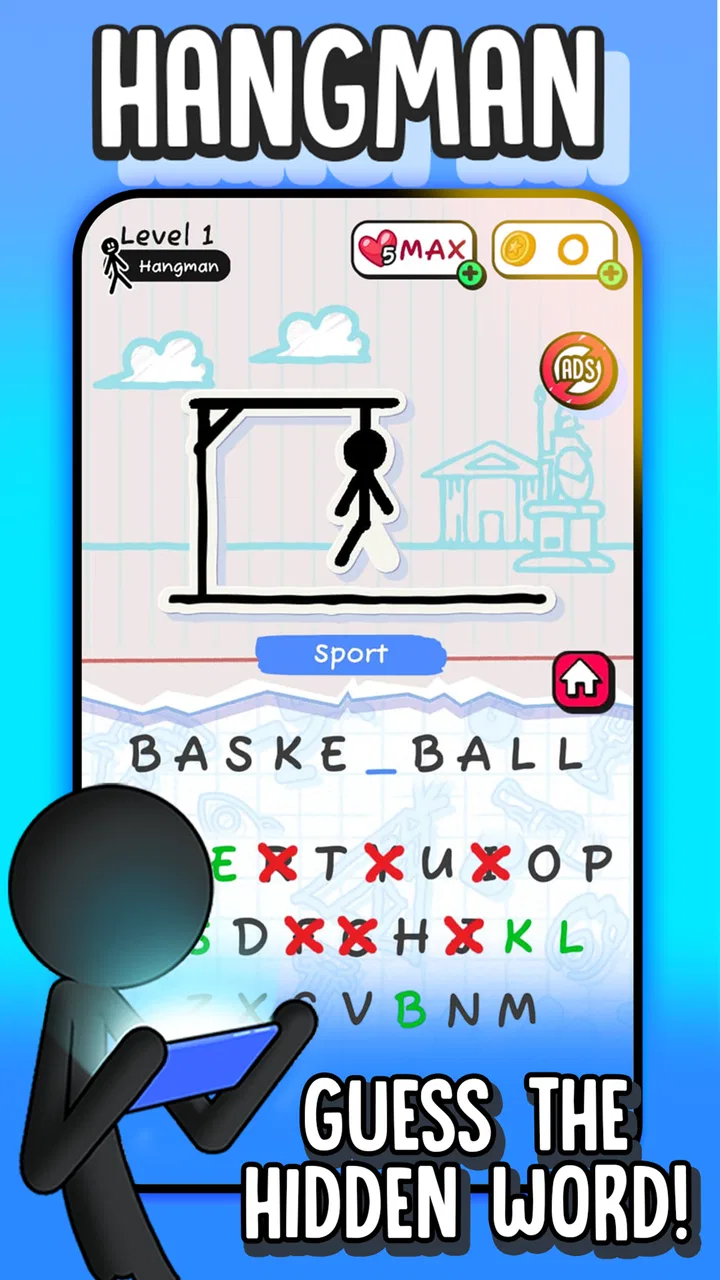
Hangman
- 4.6
- Rating
- 50.00M
- Installs
- Free
- Price

 Analysis by App-foxy
I like word games that are easy to start but still make me think for more than a few minutes, and Hangman from Senior Games fits that role well. It takes the familiar letter-guessing format and turns it into a compact mobile game that works for short breaks, casual play, or a relaxed challenge with another person. The basic idea is immediately clear: uncover a hidden word by choosing letters before your mistakes catch up with you.
That simplicity is the main reason I kept coming back to it. I do not need to learn a complicated rule set, build a character, or wait for a long match to finish. I can open it, solve a few puzzles, and leave. At the same time, the game includes battles, so it is not limited to solitary word solving. My overall impression is that it is best understood as a friendly, accessible word puzzle game rather than a deep vocabulary trainer or a competitive tournament platform.
How the everyday game flow feels
The first few rounds are straightforward. A hidden word appears, and I choose letters to reveal it. Correct guesses gradually make the answer visible, while incorrect guesses reduce the room I have left for error. That familiar structure gives each puzzle a small tension curve: early guesses are exploratory, but later guesses feel more deliberate because the remaining options matter more.
You May Also Like

 Blood Strike: 2.5 Anniversary
Blood Strike’s Loadouts Turn Every Drop Into a Tactical Gamble
A close look at Blood Strike’s custom loadouts: how fast access to signature weapons reshapes its battle royale rhythm, rewards preparation, and narrows the gap between fights.

 Pandora - Music & Podcasts
Pandora’s Music Is Easy to Start, but Harder to Recover
Pandora’s strength is its low-effort path from a seed to a station. Its weak spot is how much confidence it asks you to place in connection, setup, and quiet recovery.

 8 Ball Pool
8 Ball Pool Is Built on Rivalries, Rematches, and Routine
A close look at the rivalries, rematches, shared routines, and unanswered safety questions that turn a quick pool match into a persistent mobile community.

 Samsung Music
Samsung Music’s Quiet Strength Is Playing What You Already Own
Its reach comes less from spectacle than from dependable access to a personal library. That simplicity is both the app’s strongest retention engine and its ceiling.

 AccuWeather: Weather Radar
AccuWeather Review: A Quick, Clear Forecast for Everyday Decisions
For everyday plans, the best forecast is the one you can understand quickly. AccuWeather makes rain timing, radar, and local conditions easy to act on, with a few trade-offs.

 Hill Climb Racing
Why Hill Climb Racing Still Turns Crashes Into One More Run
A tiny car, a bumpy hill and one more upgrade: Hill Climb Racing keeps resurfacing because its simple chaos makes every near-miss feel personal.
More From Our News Desk



In practice, I found the game particularly suitable for those moments when I have only a little attention to spare. A short queue, a coffee break, or a few minutes before bed is enough time to play. Unlike a long-form crossword, I do not have to remember several clues at once. Unlike a timed action game, I can pause mentally between choices and consider the word pattern.
A useful everyday habit is to avoid guessing the first letter that comes to mind simply because it is common. I look at the visible pattern, count the spaces, and consider whether the word is likely to use a familiar ending or repeated letter. That small pause makes the game feel less random. It also turns a basic guessing activity into a practical exercise in word structure.
The battle option changes the mood. Playing against another person gives each correct or incorrect guess more weight, especially when the word is nearly complete. I enjoy that mode when I want a little pressure, but I would not choose it when I am looking for a completely quiet solo experience. The appeal depends on whether I want to test my own pace or share the challenge.
One of the strongest points is how little preparation the game demands. There is no need to gather a group, find a physical word list, or explain the rules to someone who has never played hangman. I can hand the phone to a family member and begin almost immediately. The Everyone content rating also makes it a comfortable choice for mixed-age households, although younger players may still need help with unfamiliar vocabulary.
The game is free to play, which removes the biggest barrier to trying it. Optional purchases range from small amounts to more substantial item prices, so anyone who is sensitive to in-app spending should pay attention before confirming a purchase. I appreciate being able to sample the core experience without paying upfront, but I would still recommend treating the purchase system as part of the decision rather than assuming every part of the game is entirely free.
What I do before making a guess
My usual routine is simple. I first scan the number of letters, then identify any revealed pattern, and only after that choose a letter. If the board shows a common combination, I think about possible words rather than isolated characters. For example, a partial ending can be more useful than guessing another vowel without a reason.
I also try not to waste an early turn on a letter that has already been ruled out in my mind. That sounds obvious, but the quick pace of mobile play makes careless repetition surprisingly easy. A deliberate rhythm helps: inspect the board, name two or three possible words mentally, and choose the letter that separates those possibilities.
This approach matters most when the answer contains a repeated letter. A correct guess can reveal more than one position and dramatically narrow the possibilities. That is why I do not automatically assume that a letter appears only once. Looking for repetition is one of the easiest ways to improve without learning obscure vocabulary.
For a family session, I would use the game slightly differently. I would let one player suggest a letter and ask them to explain why they chose it. That turns a quick round into a small vocabulary lesson without making the activity feel like homework. With children, I would also treat unfamiliar words as discussion points rather than signs that they played badly.
Settings and habits worth checking
Before settling into regular play, I recommend looking through the available settings and options rather than accepting the default experience automatically. The most useful choices are the ones that affect comfort and pace: sound, notifications, display behavior, and any available game preferences. I would not change everything at once. I make one adjustment, play a few rounds, and keep only what genuinely improves the experience.
Sound is worth considering if I play in public or late at night. A quiet setup makes the game easier to use discreetly, while audio feedback can make a shared session feel more lively. Notifications deserve the same practical attention. If I want Hangman to remain an occasional break, I prefer not to let reminders turn it into another source of interruption.
On a smaller phone, I pay attention to how comfortably I can read the letters and the puzzle area. If the interface feels cramped, rotating the phone or increasing system text size may not change the game itself, but it can make repeated play less tiring. I also avoid playing with one hand while walking or doing another task; the game is simple, but guessing still benefits from attention.
There is another setting-related habit that helps with spending. I keep purchase confirmation under control through my device settings and avoid tapping quickly through screens when I am focused on a puzzle. The optional items are priced from $0.49 to $30.99 per item, so a deliberate pause before any purchase is sensible. I see these items as optional conveniences, not as a reason to rush through the main game.
The current version is 6.0.60, and the game runs on Android 7.1 or later. That makes it relevant for people using older compatible Android devices, not just recent phones. I would still keep the app updated when possible, because a current installation is generally the safest way to receive the developer’s latest adjustments and fixes.
How I become faster without guessing blindly
Speed in Hangman is not simply about tapping quickly. It comes from reducing unnecessary guesses. I begin with letters that are likely to divide the remaining word choices, but I do not follow a rigid alphabet strategy. A common letter is useful only when it fits the pattern and gives me meaningful information.
One technique I find effective is to separate discovery from confirmation. During discovery, I use a guess to learn about the word’s structure. During confirmation, I choose a letter because I already have a strong candidate in mind. Mixing those two stages can lead to impulsive guesses, while keeping them distinct makes each turn more purposeful.
I also watch for word endings. Once a puzzle reveals enough of the final section, common grammatical patterns can narrow the field quickly. The same applies to beginnings and familiar letter pairs. This is more reliable than memorizing a list of “best letters,” because the best choice changes with every visible pattern.
Another practical shortcut is to keep a mental record of failed letters. I do not need to write them down in a normal round, but I consciously group them as letters that are no longer worth considering. This is especially useful in a battle, where nervousness can make me repeat a guess that has already failed.
When I play several rounds in one sitting, I take a short pause after a difficult puzzle instead of immediately tapping into the next one. That pause helps me notice whether I am making the same mistake, such as overusing vowels or ignoring repeated letters. A repeatable habit is more valuable than a lucky streak because it improves decision-making across different words.
For players who want to practice, I suggest focusing on accuracy first and speed second. A fast wrong guess teaches very little, while a careful guess can reveal how the word was constructed. Once the pattern-recognition habit becomes automatic, the pace usually improves on its own.
Where the game is strong, and where it stops
Hangman is strongest when I want a familiar word challenge with minimal friction. It is easy to explain, easy to revisit, and flexible enough for solo play or battles. The large community around it reflects that accessibility: it has an average rating of 4.6 from around 610 thousand ratings, with over 50 million installs. Those figures suggest broad appeal, but popularity does not turn the game into something it is not.
The main limitation is depth. If I am looking for elaborate clues, carefully themed crossword construction, or a long progression system, I would choose a dedicated crossword or word-building game instead. Hangman’s pleasure comes from narrowing possibilities, not from solving layered clues or creating words from a large collection of tiles.
I also would not use it as my only tool for serious vocabulary development. It can expose me to words and encourage me to think about spelling, but the game’s central feedback is whether a letter is present, not a detailed explanation of meaning, pronunciation, or usage. For language study, a vocabulary app with definitions and examples would be more suitable.
The battle format is another trade-off. It adds energy, but it may not satisfy someone who wants a fully asynchronous or deeply strategic multiplayer experience. The game is better for quick shared competition than for players seeking rankings, elaborate team systems, or a long-term esports-style challenge. I enjoy the pressure in small doses, but I would not install it solely for competitive play.
There can also be a difference between recognizing a word and knowing its spelling. A player may understand the answer but lose because a particular letter was not considered in time. That is part of hangman’s design, yet it can feel frustrating for younger players or anyone still learning English. In those cases, playing together and discussing the word afterward makes the experience more rewarding.
The developer, Senior Games, has positioned this as an approachable game rather than a specialist word laboratory. That focus works for casual users, families, and people who enjoy classic formats. It is less convincing for players who quickly tire of repeated guessing mechanics or expect a large variety of puzzle types within one application.
Who should install it
I would recommend it to someone who wants a free, uncomplicated word game for short sessions. It is a good fit for commuters who prefer mental play over scrolling, families looking for a simple shared activity, and casual players who like the satisfaction of revealing a word one letter at a time.
It is also useful for people who enjoy improving through small habits. Watching patterns, tracking failed letters, and identifying repeated characters gives the game more substance than a purely random guessing exercise. Those techniques make the experience feel fairer and help a player become more consistent without requiring a guide or a long tutorial.
I would suggest skipping it if you want advanced crossword clues, a serious language curriculum, or a highly developed competitive system. A different word game will serve those needs better. I would also hesitate to recommend it to anyone who dislikes optional purchase prompts or prefers apps with no in-app spending at all, even though the game itself is free to download and play.
For an older Android phone, the minimum requirement of Android 7.1 is helpful because it does not restrict the game to the newest hardware. For iPhone and iPad users, the same basic appeal applies: this is a compact word challenge, not a graphics-heavy title that demands a powerful device. The important question is less about hardware and more about whether the classic format matches your taste.
My verdict after settling into the routine
After using it as a regular short-break game, I see Hangman as a dependable choice for anyone who values immediate play and familiar rules. Its best qualities are clarity, accessibility, and the small decisions that emerge once I stop guessing carelessly. The battle mode gives the format extra life, while the solo rounds remain comfortable when I want something quieter.
I would not call it a complete word-learning platform or a replacement for a rich crossword collection. Its limits are visible, especially for experienced puzzle fans who need more variety and deeper clues. Still, that narrow focus is also why it works: I can open it without preparation, understand the objective instantly, and finish a meaningful round in a short amount of time.
The game is free, rated for Everyone, and has been available since April 26, 2018, giving it a long-running place in the casual word-game space. With Senior Games behind it and a broad installed audience, it is an easy title to try when I want a low-pressure mental break. My advice is to adjust the comfort settings, keep purchases deliberate, and play with a pattern-first approach rather than tapping random letters.
For me, that combination makes Hangman worth recommending to casual players and families. It will not satisfy every kind of word-game fan, but when I want a familiar puzzle that starts quickly and rewards careful guessing, it does exactly what I need.
FAQs for Hangman
01What is Hangman and how does it work?
Hangman is a classic word puzzle game where players guess letters to form a hidden word. With each incorrect guess, a part of a stick figure is drawn, symbolizing the player’s failure to guess the word correctly. The game ends when the word is guessed or the figure is fully drawn.
02Is Hangman suitable for all ages?
Yes, Hangman is suitable for players of all ages. It is a simple, educational game that can help young children improve their vocabulary and spelling skills while also providing entertainment for adults. However, some versions may offer complex words, so parental guidance might be needed for younger players.
03Does Hangman require an internet connection to play?
Most versions of Hangman do not require an internet connection once downloaded, allowing you to play offline. However, some features like multiplayer modes or accessing additional word lists might need internet access. Always check the app’s requirements before downloading if offline play is important to you.
04Are there different difficulty levels in Hangman?
Yes, many Hangman apps offer various difficulty levels to accommodate different skill sets. Players can often choose from beginner, intermediate, and advanced levels, which adjust the complexity of the words and the number of guesses allowed. This ensures a challenging experience for all players.
05Does Hangman have any in-app purchases or ads?
While many Hangman apps are free to download, they may include ads or offer in-app purchases. These can range from removing ads, accessing additional word packs, or unlocking special themes. It’s important to review the app’s description and user reviews to understand its monetization model before downloading.
Pros
- Simple
- intuitive gameplay for all ages.
- Enhances vocabulary and spelling skills.
- Offline play available
- no internet needed.
- Multiple difficulty levels to choose from.
- Visually appealing and user-friendly design.
Cons
- Limited word categories without in-app purchases.
- Repetitive music can become annoying.
- Ads may interrupt gameplay frequently.
- No multiplayer mode for social play.
- Lacks in-depth customization options.

Hangman
Gallery